Tools
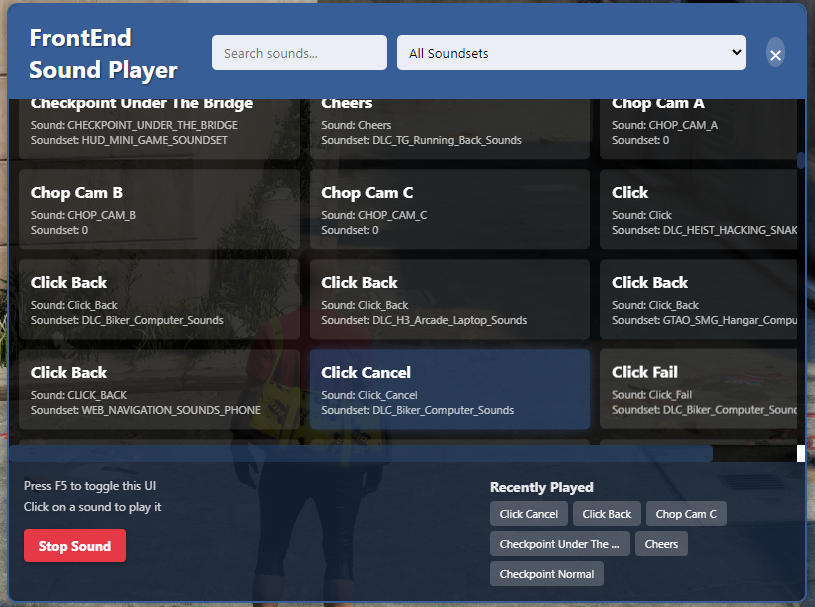
Frontend Sound Player
Frontend Sound Player
Browse, search, and play GTA V frontend sounds directly in-game.
A lightweight FiveM resource that gives developers and server owners instant access to hundreds of GTA V frontend sounds through a clean, modern interface. Whether you're creating scripts, testing audio, or simply looking for the perfect sound effect, this tool makes finding and previewing sounds fast and effortless.
No more trying to figure out what's what now everything is available in-game with just a single key press!
Features
-
🎵 Browse hundreds of GTA V frontend sounds
-
🔍 Instantly search for specific sound names
-
📂 Filter sounds by soundset
-
🕒 Recently played sounds history for quick access
-
⏹️ Stop currently playing sounds with a single click
-
⌨️ Quick access via registered keymapping default set to SUBTRACT
-
💻 Modern, clean, and responsive NUI interface
🚀 Perfect For
-
FiveM Developers
-
Server Owners
-
Script Creators
-
Audio Testing
-
Notification & Interaction Design
Whether you're building a phone, inventory, job system, or custom UI, GTA Sound Player lets you quickly test sounds without leaving the game.
⚡ Developer Friendly
Designed with developers in mind, the resource includes built-in tools for keeping the sound database up to date. The included parser can regenerate the sound list from GTA's sound reference files using either Node.js or Python, making future updates quick and painless.
📦 Features at a Glance
-
✅ Standalone resource
-
✅ Lightweight and optimized
-
✅ Modern NUI
-
✅ Searchable sound database
-
✅ Soundset filtering
-
✅ Recently played history
-
✅ One-click sound playback
-
✅ Stop sound functionality
-
✅ Automatic sound database generation tools
-
✅ Easy installation
Included
-
GTA Frontend Sound Player resource
-
Modern NUI interface
-
Search and filter system
-
Recent sounds history
-
Built-in parser tools for updating the sound database
-
Standalone installation with simple setup
Known Bugs
-
Some sounds don't stop playing even if the stop button is used, restart the script when that happens
-
Not all sounds on the list play